Welcome to Technology Integration for Schools, a resource provided by Innovative Classroom of Central Minnesota.
What is Technology Integration?
When we talk about integration, it is important to see the difference between what we do now, and what we can do that has only been dreamed of. To "use" technology means you do what you always do, but now with technology tools. To "integrate" means that you explore new ways to engage students while connecting with the content in a way that is new, exciting, and most importantly effective for learning. When we say we integrate technology, it means we are working to...
- Create something that has not yet existed
- Collaborate with others to find new understanding
- Communicate with others to find answers and more questions.
To view examples of technology integration produced by the Florida Center for Instructional Technology, - Click HERE
Click HERE to learn more about how to use Audioboo with students...
Interested in registering for any of the following applications? Click to get started...

Prezi.com
|

Weebly for Education
|

Edmodo
|

Khan Academy
|

Hippocampus
|
Want to explore "flexbooks" for learning?

Check out CK-12 for free resources in many learning areas...
Click the logo to the left to log in or explore.
Click the logo to the left to log in or explore.
Want to explore just a few apps?
iMovie - http://itunes.apple.com/us/app/imovie/id377298193?mt=8
Google Earth - http://itunes.apple.com/us/app/google-earth/id293622097?mt=8
Book Creator for iPad - http://itunes.apple.com/us/app/book-creator-for-ipad/id442378070?mt=8
ShowMe - http://itunes.apple.com/us/app/showme-interactive-whiteboard/id445066279?mt=8
Audioboo - http://itunes.apple.com/us/app/audioboo/id305204540?mt=8
iTunes U - http://itunes.apple.com/us/app/itunes-u/id490217893?mt=8
Keynote - http://itunes.apple.com/us/app/keynote/id361285480?mt=8
Find my iPhone - http://itunes.apple.com/us/app/find-my-iphone/id376101648?mt=8
Socrative (Students) - http://itunes.apple.com/us/app/student-clicker-socrative/id477618130?mt=8
Socrative (Teacher) - http://itunes.apple.com/us/app/teacher-clicker-socrative/id477620120?mt=8
Volume Purchase Information
http://www.apple.com/education/volume-purchase-program/
Looking for ideas with your iPads
http://itunes.apple.com/us/institution/apple-distinguished-educators/id380379132
Google Earth - http://itunes.apple.com/us/app/google-earth/id293622097?mt=8
Book Creator for iPad - http://itunes.apple.com/us/app/book-creator-for-ipad/id442378070?mt=8
ShowMe - http://itunes.apple.com/us/app/showme-interactive-whiteboard/id445066279?mt=8
Audioboo - http://itunes.apple.com/us/app/audioboo/id305204540?mt=8
iTunes U - http://itunes.apple.com/us/app/itunes-u/id490217893?mt=8
Keynote - http://itunes.apple.com/us/app/keynote/id361285480?mt=8
Find my iPhone - http://itunes.apple.com/us/app/find-my-iphone/id376101648?mt=8
Socrative (Students) - http://itunes.apple.com/us/app/student-clicker-socrative/id477618130?mt=8
Socrative (Teacher) - http://itunes.apple.com/us/app/teacher-clicker-socrative/id477620120?mt=8
Volume Purchase Information
http://www.apple.com/education/volume-purchase-program/
Looking for ideas with your iPads
http://itunes.apple.com/us/institution/apple-distinguished-educators/id380379132

What is TPACK?
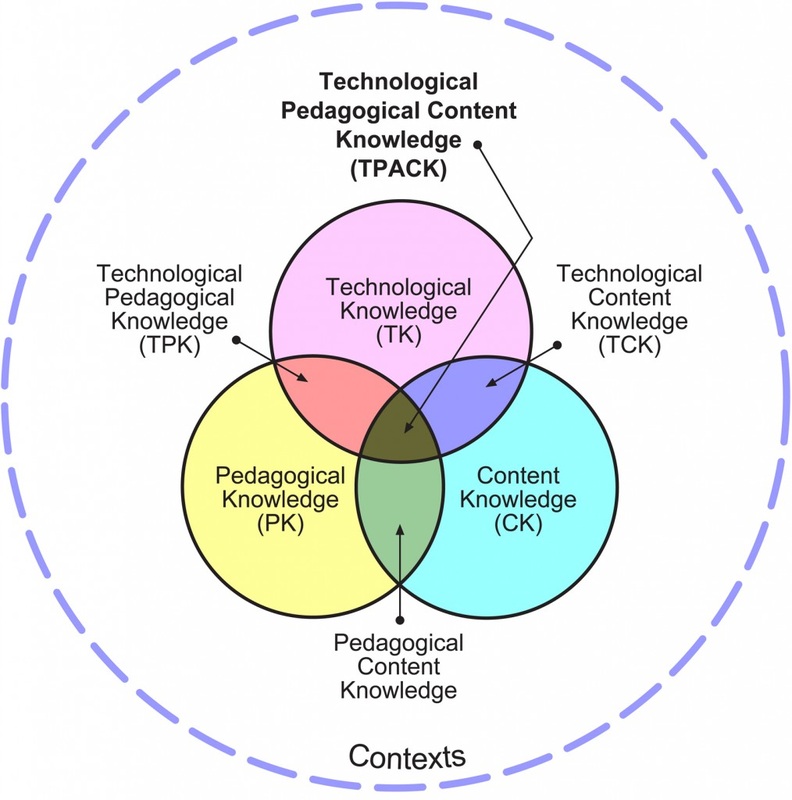
Click above image to enlarge
A common concern when talking about technology is the fear that some express about "not knowing enough". There is a perception that technology is for "those younger teachers". What we need to realize is that technology integration is much more then knowing how to use a tool. Instead, it is the knowledge of how tools interact well with good teaching strategies (pedagogy) and a strong content understanding (content) in a particular context. Thus, to effectively integration technology means that one must have a strong knowledge in all regions. While our younger teachers may have a background with technology tools, they may not yet have full understanding of teaching strategies and the content. We must all sit together, share our understandings in order to best find ways to integrate technology. It is only then that we will fully discover ways to best integrate technology.
Watch Full Show on PBS. See more from Digital Media - New Learners Of The 21st Century.